
Button Remapping — your layout, your rules
Swap any face button, trigger, bumper or back paddle to any other input. Play claw grip on a stock DualSense, run bumper-jumper without Elite hardware, or put grenade-throw on a back paddle you can actually reach. On-controller, no menus, no software, five save slots.
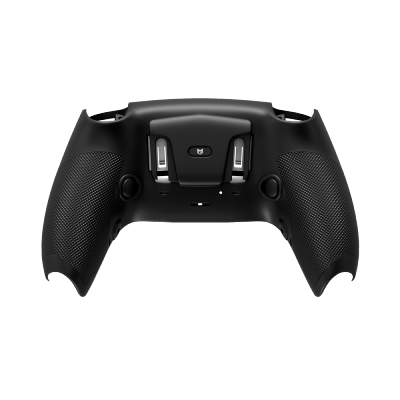
What is the Button Remapping mod?
A hardware-level button-swap that lives on the controller itself. No in-game settings, no companion app, no cloud profile — the remap is stored on the chip and survives across consoles, games, and even different accounts.
Button Remapping lets you bind any physical input on the controller to any other input. Pull R2 to throw a grenade, click L3 to jump, tap Triangle to reload — whatever layout makes sense for your hands, your grip, or the game you're playing. The remap happens inside the chip: when you press a button, the chip intercepts the HID event, swaps it for the target input, and sends that along to the console. The console never knows you pressed the original button.
Why this beats in-game remapping
- Works across every game — in-game settings are per-title and often incomplete. Our remap travels with the controller to every game on your console.
- No Pro controller needed — Scuf, Elite, Edge and Razer controllers all have remapping built in for $170–$220. Our mod gives you the same feature on a $35 stock controller.
- On-controller combo — set up remaps with a button combo held during pairing, no menus or PC required. Change layouts mid-match without pausing.
- Console-agnostic — a remap set on PS5 still works when you plug the same controller into PS4 or PC.
What you can remap
- Face buttons — X, O, Square, Triangle (or A, B, X, Y on Xbox).
- D-pad — up, down, left, right, each independently.
- Bumpers and triggers — L1/R1, L2/R2 (or LB/RB, LT/RT).
- Stick clicks — L3, R3.
- Back paddles — if your build includes them (2 or 4 paddle options).
Five saved layouts, one button to switch
The chip holds up to five complete remap profiles. Switch between them with a button combo — default layout for campaign, claw layout for Fortnite, bumper-jumper for CoD, sniper-paddle for PUBG, and one spare slot for whatever weird game you're obsessing over this week.
Where Button Remapping shines
Nine common scenarios where an on-controller remap turns a stock DualSense or Xbox pad into a pro-spec layout machine.
Bumper-jumper layout
The pro layout. Jump on L1, ADS on L2, fire on R2 — no claw needed. Stock DualSense users finally get the layout Elite players have had for years.
Builder Pro + claw swap
Put build-mode button cycling on back paddles so your thumb never leaves the right stick during edit plays. Wall-ramp-floor chain without claw-grip thumb pain.
Slide-jump paddle
Bind crouch to a back paddle so slide-jumps and super-glides are two-finger combos instead of thumb-dance nightmares. Movement tech becomes consistent.
Lean paddles
Remap left-lean and right-lean to back paddles. Peek and re-peek without taking your thumb off aim — the number-one edge in ranked Siege.
Horn + grenade remap
Stock GTA buries the horn on L3 while driving. Remap horn to a paddle and grenade-throw to Triangle — convoy getaways get dramatically easier.
Jump on bumper
Jump-and-shoot becomes a two-finger squeeze instead of a thumb-off-stick maneuver. Build-less fights feel cleaner immediately.
Prone + vault paddles
Both mobility buttons on back paddles means you keep aim while diving prone or vaulting cover — a huge asset in Breakthrough meat grinders.
Lean spam + hold breath
Lean on one paddle, hold-breath on another, primary fire on R2. Long-range Kar98 duels become a two-hand precision tool instead of a thumb puzzle.
Left-handed mirror
A clean left-handed layout mirrors every input across the center. Left-handed players who'd normally need specialty hardware get a pro-spec setup for stock controller price.
Why Button Remapping matters more than the flashy mods
Rapid Fire wins fights once. A good button layout saves your thumbs for 10,000 hours.
No claw grip pain
Claw grip is the console equivalent of carpal tunnel. Remapping lets you hit the same inputs with paddles or alternative buttons — same mechanics, zero hand fatigue.
Pro layouts on stock hardware
Bumper-jumper, tactical, flipped, legacy, builder pro — every pro-tier preset plus anything you invent yourself, on a $35 stock controller instead of a $200 Elite.
Five profiles, one button
Save up to five full layouts and switch between them with a button combo. No menus, no restart. One layout per game, or a specific one for each map.
Invisible to anti-cheat
A remapped button press is identical to the target button being pressed directly. Anti-cheat has nothing to flag — the same signal, just triggered by a different physical input.
How to set up a remap
Three button combos, 30 seconds. Detailed instructions ship with every controller, but here's the quick version.
Setting a remap
- Enter remap mode — hold Share + R3 for three seconds. LED flashes orange.
- Press the destination button — the button you want to trigger the action. Example: left back paddle.
- Press the source input — the button whose action you want to copy. Example: L3 (jump in COD).
- Confirm — LED flashes green. You're done. Left paddle now jumps.
Saving a profile
Once all your remaps are set, hold Options + D-pad direction (up / down / left / right / none) for two seconds to save to a slot. The LED confirms with a color burst.
Switching profiles in-game
Tap Options twice quickly then press the D-pad direction of the slot you want. Switch happens instantly — no pause, no menu. Most players map one slot per game and switch as they swap titles.
Resetting to stock
Hold Share + Options + PS button for five seconds. All remaps cleared, stock layout restored. Useful before lending your controller to someone who isn't used to your layout.
Button Remapping FAQ
The questions we hear from layout-obsessed players.
How is this different from the remap feature in the console settings?
Do I need back paddles to benefit from remapping?
Will anti-cheat flag remapped inputs?
Can I remap buttons to macros (multi-button sequences)?
Does remapping work in every game?
What if I want to go back to stock temporarily?
Can I share my remap profiles with a friend?
Available on PS5, PS4, and Xbox One?
Related mods
Button Remapping pairs perfectly with these — especially the macro-style mods that want a custom trigger location.
Button Remapping ships on every MegaMods controller
Pick a platform and your controller arrives in 1–2 days with Remapping and 19 other mods installed, tuned for every major FPS on console.